How to Watch VALORANT Esports Legally: Streams and Co-Streams
Written by Valorant Village
Source-backed coverage ●
Searching “VALORANT esports live” is a surprisingly quick way to land on an old VOD, a fan commentary stream or a mirror with no obvious source. The reliable route is simpler: start at Riot’s live schedule, open the event or match page, then follow the broadcast link it provides.
This guide was checked on August 14, 2026. Channel pages, event permissions and platform policies can change, so use the live event page as your final check. This is a viewing guide, not legal advice.
Start at the official schedule
The VALORANT Esports schedule is the best first stop because it gives a channel some context. The page groups the season by region and event stage, shows date-based fixtures, and currently attaches “Watch” links to completed matches. Those links lead to official VOD pages instead of leaving you to guess which upload belongs to the series.
For an upcoming match, confirm four things before you press play: the league, the event stage, the teams and the local start time. For a finished match, use the “Watch” link attached to that fixture. A search result or an old social graphic can still be useful as a lead, but it is a poor final authority when the live schedule says something else.
Follow a verified broadcast link
The VCT Americas 2026 Stage 2 guide, published June 24, 2026, says official broadcasts are available on Twitch and YouTube in English, Spanish and Portuguese. When checked on August 14, it linked these channel destinations:
Those are verified channel links from that event guide, not a promise that every page will be live when you visit. The guide also says broadcast days and times are updated in real time on the VALORANT Esports site. That is why the event page comes first: a channel can be showing a replay, a different region or a different series.
Know which kind of stream you found
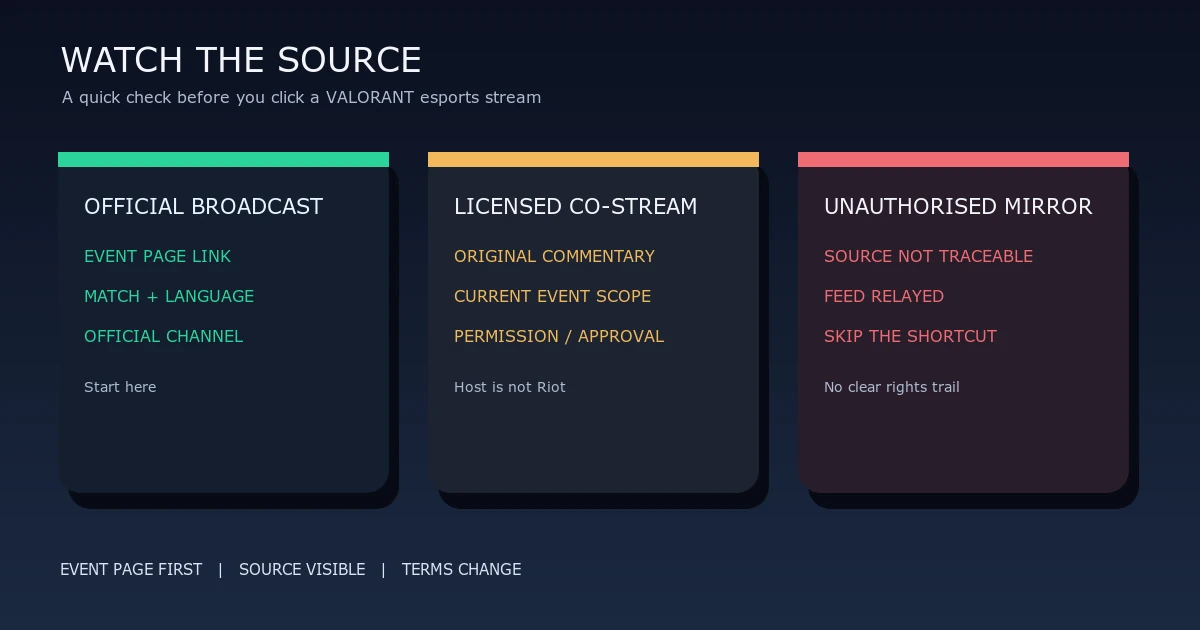
The word “co-stream” does not mean “anything with a webcam beside the match.” Look for evidence.
| Stream type | What you should be able to check | Practical meaning |
|---|---|---|
| Official broadcast | The event page or Riot’s event guide points to the channel, and the league, match and language line up. | This is the cleanest option for watching. |
| Licensed co-stream | The host adds original commentary and has current event guidance or written approval covering the event, region and language. | Permission is scoped. A popular host is not automatically authorised for every VCT match. |
| Unauthorised mirror | The feed is mostly relayed, the source cannot be traced to the event page, and no permission or relationship is disclosed. | Skip it. You do not need to prove the channel’s status before choosing a source you can verify. |
A co-stream may look less “official” than the main broadcast because it belongs to the host. That is fine when the permission trail is clear. The reverse is also true: a channel can use official-looking words in its name and still give you no evidence that it is connected to the event.
Co-stream permission is event-specific
The Americas guide’s co-streaming section tells anyone who wants to host a Watch Party to read the VCT Co-streaming Guidelines and follow the required steps. It lists separate application routes for North America, Latin America and Brazil, and says global events such as Masters and Champions need additional special permissions.
The linked PDF is titled “[VCT 2024] Americas Watch Party Guidelines.” Its watch-party terms describe a license to distribute a public event feed with casting and commentary, alongside obligations such as following platform terms, disclosing a material connection and moderating the watch-party chat. Since that file is a 2024 document linked from a 2026 regional article, treat it as an example of event terms, not a standing licence for every event. A form submission is not the same thing as approval, either. If the current event page says to wait for confirmation, wait.
Riot’s Legal Jibber Jabber page is even older: it says “Last Updated: August 2018.” It supports the basic caution that fan projects need original contribution and must not imply Riot endorsement, but it is not a substitute for the current watch-party instructions. Read the event-specific terms each time.
Why mirrors are a bad shortcut
The platform rules are practical warning signs, even when you are only watching. Twitch’s Community Guidelines say users may not share content they do not own or otherwise have rights to share. Twitch says unauthorised content can be removed and repeated violations can lead to permanent suspension.
YouTube’s Copyright issues with live streams page says every live stream is scanned for third-party content, including another live broadcast. It warns that a stream can be interrupted or terminated if the feed remains, and says even licensed third-party content may need the rights owner to add the channel to a Content ID allowlist. Those are platform enforcement rules, not a court’s answer to every copyright question in every country. They are still a good reason not to build your viewing routine around a mirror.
A 60-second pre-match check
- Open the official schedule and confirm the event, teams and start time.
- Follow the “Watch” link or the channel destination linked by the event guide.
- Check that the broadcast language and region match the series you meant to watch.
- If it is a co-stream, look for current permission that covers this event, not just a different league or an old season.
- If the source is unclear, use the official broadcast or VOD and move on.
That small habit saves time later. You get the right match, a replay you can find again, and a much clearer line between Riot’s broadcast, a permitted watch party and a feed that should not be there.
For the match context, see our Stage 2 qualification guide and VCT veto guide.
Sources checked
The live schedule and the VCT Americas guide were checked in a real browser on 2026-08-14 UTC. Riot’s Legal Jibber Jabber page was checked with its displayed August 2018 update date. The VCT watch-party PDF, Twitch Community Guidelines and YouTube Help page were opened on the same date. Links above point to the exact pages used; read the current event and platform terms before hosting or rebroadcasting anything.