Why VALORANT Sensitivity Can Feel Different Between Accounts
Written by Valorant Village
Source-backed coverage ●
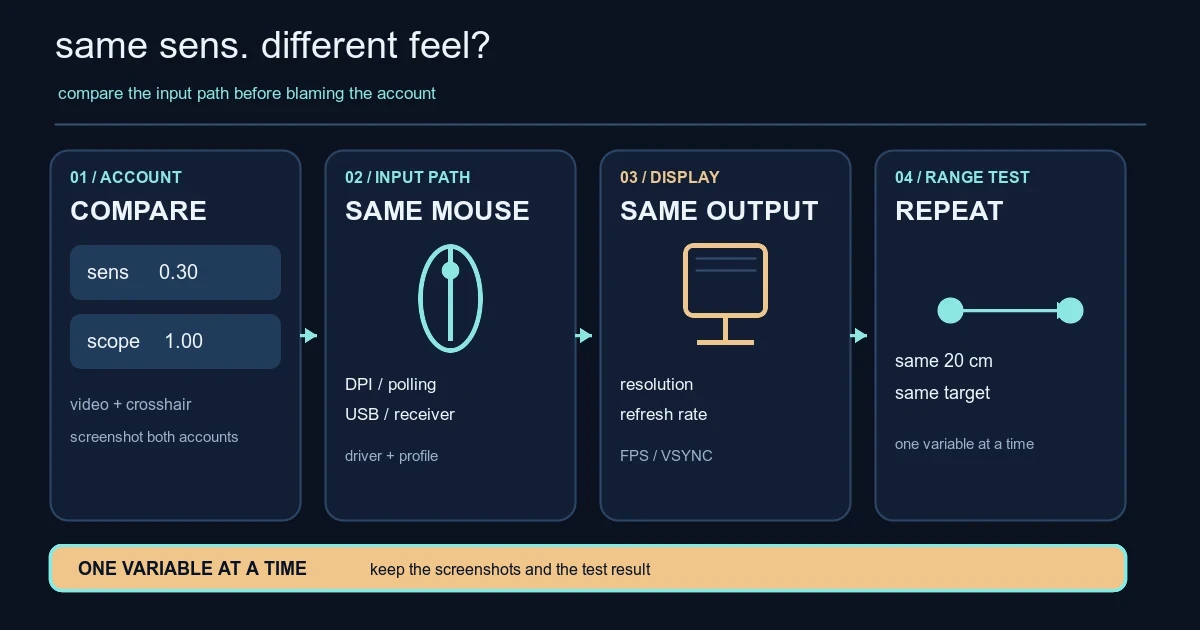
If 0.30 feels right on one VALORANT account and wrong on another, the account switch is a clue, not a diagnosis. A different mouse profile, display mode, frame-time pattern or client configuration may be involved. Riot’s current Troubleshooting Keyboard/Mouse Issues page treats this as an input and configuration problem: try another peripheral, update drivers, check in-game settings and background apps, and consider a configuration reset if the files are corrupted. It does not document a hidden per-account sensitivity multiplier.
Start with the values you can actually compare
Take a screenshot of the settings screen on both accounts before changing anything. Compare mouse sensitivity, Scoped/ADS/Sniper multipliers, keybinds, crosshair, resolution, display mode, refresh rate and any frame-rate cap. The crosshair does not change the mouse math, but it can change how quickly a movement feels wrong.
If one value differs, copy the baseline and test again. If every value matches, move outward through the rest of the setup. Profiles, patches, resets and plain old human error can alter settings. The account name itself is not evidence of a hidden fix.
Raw Input Buffer is another detour. In Patch Notes 3.07, displayed October 6, 2021, Riot described the beta setting as an API change and expected minor performance improvement with identical input latency for standard devices and gaming mice; it called out larger improvement for 8000Hz mice. In Patch Notes 11.06, displayed September 17, 2025, Riot said the setting was removed and enabled for everyone. There is no supported account-by-account toggle. Do not edit a config file or install a tool that promises to unlock one.
The setup around the mouse can change the feeling
Use the same mouse, pad, USB port or wireless receiver, monitor and seat while comparing accounts. Check the active DPI stage and polling-rate profile in the mouse software, plus any overlay, capture program, driver update or clean-boot change. These are isolation steps, not proof of a cause. Riot’s troubleshooting page recommends another peripheral, updated drivers and a Clean Boot to find background-app interference.
Display settings deserve their own check. Riot’s Supported Resolutions in VALORANT, displayed May 15, 2026, says unsupported extra-wide resolutions can produce black bars that crop the screen, highly recommends 16:9, and warns that fullscreen issues may appear with some supported 5:4, 16:10 and 21:9 modes. A different picture shape does not silently rewrite your sensitivity, but it can make the same turn look unfamiliar.
Refresh rate and frame rate are separate, too. Riot’s Refresh Rate and VSYNC, displayed January 9, 2024, says refresh rate describes display updates while FPS describes how often the game can change the image. If one setup is at 60Hz with different VSYNC behaviour and the other is at a higher refresh rate, movement may feel less immediate. That is a timing difference, not evidence that the account changed the mouse value.
Run a controlled account test
-
Make a baseline. Use one PC, mouse, pad and monitor. Pick a supported display mode, keep the same refresh rate and FPS cap, close overlays, and write down the in-game values. Preserve the starting point; do not build a science project.
-
Mark one repeatable movement. In the Range, choose a fixed reference point and mark a starting point on the mousepad. Use a repeatable distance; 20 cm is convenient, not universal. Make ten slow turns toward the same 180-degree target, then ten short target-to-target flicks with the same agent, weapon and crosshair. Record whether you stop short, pass the target or land consistently.
-
Repeat on the other account. Sign out, sign in, screenshot the settings and make the relevant values identical. Do not change sensitivity, resolution and polling rate together. Repeat from the same mark. One deathmatch score is not a measurement.
-
Read the result. If the settings differ, you found a mismatch. If slow turns land in the same place but flicks feel different, look at frame timing, crosshair visibility, fatigue and the display. If turn distance changes on the same machine, recheck the mouse profile, driver, USB or receiver, and background apps. Riot’s next checks are another peripheral, updated drivers and a Clean Boot. A configuration reset is last, so preserve screenshots first.
If the difference survives the same-machine test and follows the account across another computer with matching values, collect both screenshots, client and Windows versions, hardware details and exact test steps. Submit that package to Riot Support. There is no promise that Support will find an account-specific cause, but reproducible evidence beats “my sens feels weird.”
For the other variables that often get mixed into this problem, see our resolution and aspect-ratio guide and VALORANT input-settings investigation. The useful answer may be less dramatic than a hidden account nerf: the number matches, while the setup around it does not.
Riot sources checked
- Troubleshooting Keyboard/Mouse Issues - Riot Games Support, displayed October 29, 2025 at 5:58 AM, checked 2026-08-14 UTC. Claims: another peripheral, drivers, Clean Boot, in-game Controls and corrupted configuration.
- Supported Resolutions in VALORANT - VALORANT Support, displayed May 15, 2026 at 10:27 AM, checked 2026-08-14 UTC. Claims: black-bar cropping, 16:9 recommendation and fullscreen cautions.
- Refresh Rate and VSYNC - VALORANT Support, displayed January 9, 2024 at 7:58 AM, checked 2026-08-14 UTC. Claims: refresh rate differs from FPS; VSYNC is under Settings → Video → Graphics Quality.
- VALORANT Patch Notes 3.07, displayed October 6, 2021, checked 2026-08-14 UTC. Claim: Raw Input Buffer changed input-processing APIs and was described as a performance setting.
- VALORANT Patch Notes 11.06, displayed September 17, 2025, checked 2026-08-14 UTC. Claim: RawInputBuffer was removed as a configurable setting and enabled for all players.
- VALORANT Patch Notes 12.07, displayed April 15, 2026, checked 2026-08-14 UTC. Claim: PC Settings screens were revamped with related-setting associations, hover tooltips, reorganised sections and a visual refresh.