VALORANT Sound Cues: A Practice List for New Players
Written by Valorant Village
Source-backed coverage ●
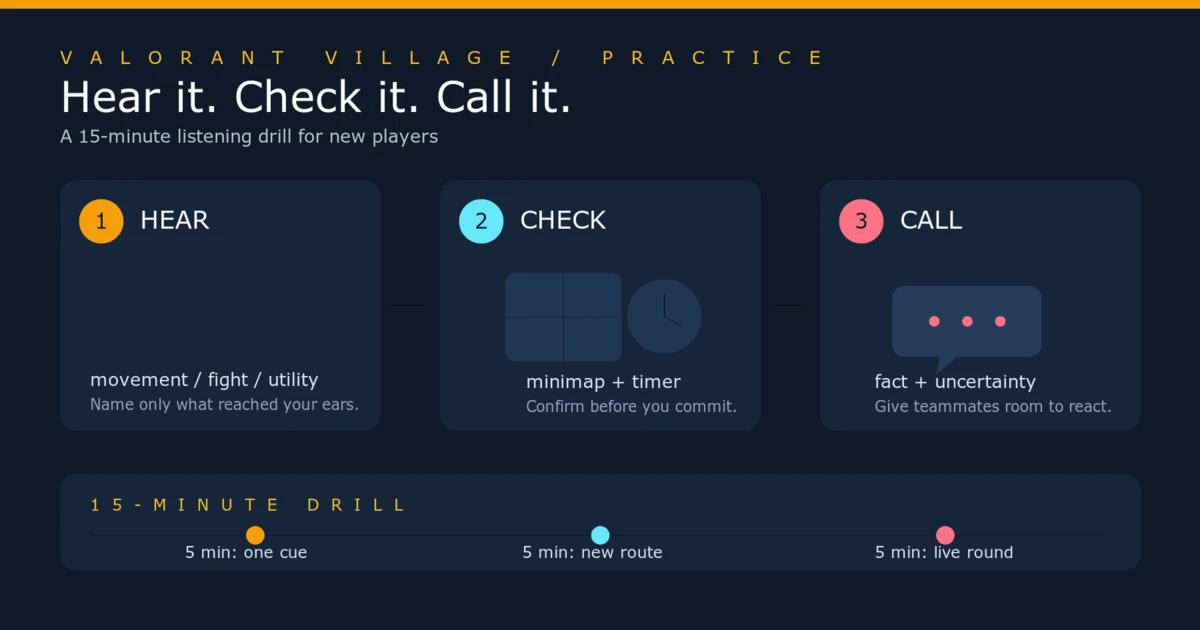
Sound gives you clues, not a complete picture. You might hear movement, a fight, an ability or a change around the Spike. The useful question is what that clue means alongside the minimap, the round timer and the position your team already holds. A sound can justify a check. It rarely justifies a perfectly certain call.
Start by fixing the audio path. Then practise one cue at a time until you can describe what you heard without guessing the rest of the round.
Fix the audio path first
Riot's current Troubleshooting Sound Issues page says to check that in-game audio is enabled, no sound category is set to zero, and the output device is either the system default or the device you actually use. On Windows, Riot also points players to the volume mixer and playback-device settings. If you are troubleshooting headphones, the page says to check the device's Exclusive Mode setting. Riot warns that surround sound can send effects to speakers you do not have, so disable it when your setup cannot reproduce surround output.
Those are Riot's support steps. The rest of this article is practice advice. If every sound is missing, fix the route from game to headphones or speakers before changing your sensitivity or trying to memorise cues. Use the same device for a full session, keep music low or off, and make one change at a time. Otherwise you will not know which change helped.
Build a simple baseline
Use the Range or a custom game and face away from the activity when possible. Ask a friend to repeat one action while you keep your eyes off the screen. You are not trying to discover an exact audible distance. You are learning what a cue sounds like on your own device, at the volume you actually play.
Write down two things: what you heard and what you could confirm. “Movement near this lane” is a useful first note. “Four players at the back of site” is a claim that needs more evidence. Repeat the drill from another route or elevation so you learn where your confidence falls apart.
Practise five cue groups
Movement
Begin with movement cues. Have your partner move along a route, stop, then change direction. Keep your crosshair and camera away from them. Call the broad information first: movement, a stop, or a change of direction. Then look for confirmation on the minimap or from a teammate.
Do not turn a footstep into an exact location. Walls, elevation, map geometry and other sounds make confident guesses brittle. The goal is to decide whether you should hold, wait for help or ask for more information.
Weapons and reloads
Gunfire tells you that a fight has started somewhere, but it does not tell you who won. A reload can be a timing clue when you are already close enough to act. It is not a free invitation to swing a dangerous angle. Use the timer and the last known positions before you make that choice.
In a custom game, repeat a few weapon sounds one at a time. Learn the broad difference between a nearby fight and a distant fight on your setup. You do not need to identify every weapon from memory to make a good decision. Position and timing matter more than showing off a sound call.
Ability activation
Learn the ability sounds attached to agents you meet often. When you hear one, ask what decision it creates: should you break line of sight, give up a space, wait for a teammate's counter-utility or continue the plan? Do not treat an activation sound as proof that the ability hit a player or blocked the route you care about. Check the visual information and the minimap.
Ability audio can also be hard to isolate during a fight. If you are unsure, say what you know and stop there. “Utility on the entrance” is better than naming an outcome you did not see.
Spike state
Practise the audio around a plant, a defuse, a pickup and a post-plant fight in a quiet custom round. The sound should prompt an objective check. It should not make you run through an unsafe doorway without considering the timer and player positions.
Riot's Patch Notes 12.11 give a useful warning about old clips and fixed assumptions. Riot said the patch fixed a bug where Agents frequently repeated the Spike pickup line when the Spike was dropped on Fracture's zipline. That is one documented bug, not a universal sound rule. If a cue seems different after a patch, check the current client and Riot notes rather than trusting a memorised clip.
Map interactions
Some maps have interaction sounds that deserve their own drill. Test the doors, ziplines or other map objects you actually encounter, but do not assume a cue behaves identically everywhere. Keep map-specific notes separate from general movement notes, and date them if the information matters to a guide or team routine.
Use sound with the rest of the round
Run this short check in your head:
- What did I actually hear?
- What does the minimap confirm or contradict?
- How much time is left, and what objective is active?
- What call gives my teammate useful room to react?
The last question matters. “One heard near B, not sure if more” gives the team information without pretending you know the whole attack. If the minimap is quiet and the timer gives the enemy time to rotate, keep the call provisional. If a teammate saw the player and your sound agrees, your confidence can rise.
A 15-minute listening drill
Spend five minutes facing a wall while a friend repeats one movement, weapon, ability or Spike cue. Spend five minutes repeating it from a different route or behind different geometry. Spend the last five minutes in a real practice round. Each time you hear something, wait a moment, check the minimap and timer, then make a short call.
After the drill, note one cue you missed and one call that was too confident. Work on those two items next session. A small list that changes your decisions is more useful than a huge table of sounds you never test.
Headphones do not replace positioning, and a sound does not remove uncertainty. Fix the signal, practise the cue, check the round, then say only what the evidence supports.
Turn the cue into a call with useful comms, then test uncertainty in a man-disadvantage round.
Riot sources: Troubleshooting Sound Issues, dated May 27, 2026 on the live page; and VALORANT Patch Notes 12.11, published June 10, 2026. Riot's support instructions are factual source material. The drills and call examples are Valorant Village editorial advice.